It has been a busy, high-energy week in the library! We’ve been blending traditional research with some hands-on Google Slides practice, and it’s been so fun to see the students get creative with their new tech skills.
2nd Grade: Australian Adventures
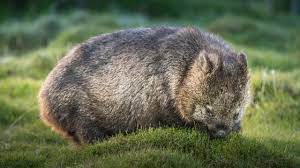
After reading the classic Wombat Stew, our 2nd graders dived into Google Slides. They practiced finding images of animals from Australia and learned how to “click and drag” to resize them. The big “magic trick” this week? Learning how to use the send to back feature so their animals stayed where they belonged in the scene!
3rd Grade: Arctic Explorers
3rd grade has been hard at work researching Arctic animals using a slide template. They’ve been watching short videos and picking out three interesting facts to share. We are working on turning those facts into bulleted lists and adding matching images. We definitely had to pause for some spelling help here and there, but their focus was incredible!
4th Grade: Birds, Bats, and Stellaluna
Our 4th graders read Stellaluna and used the story to dig into story elements and characters. They even tackled a Venn diagram to compare the differences between birds and bats. To wrap it all up, they’re creating their own research slides by building text boxes from scratch and adding images to show what they’ve learned about bats.
 Tech Fun In The Library